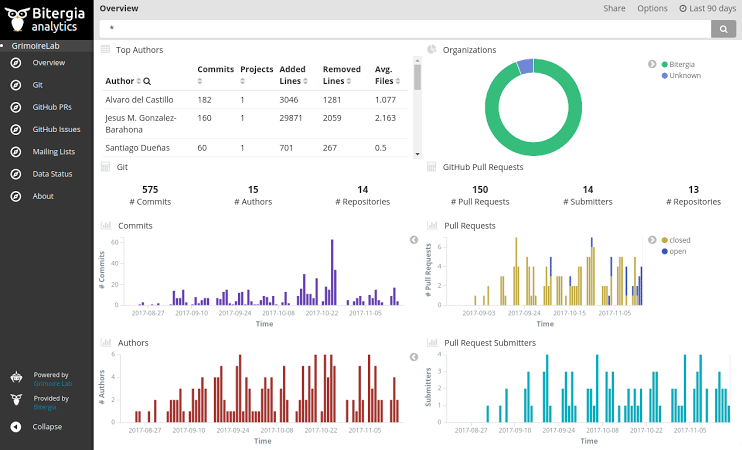
In today’s data-driven business world, tracking Key Performance Indicators (KPIs)is critical for monitoring progress and making informed decisions. But with so much data available, it can be overwhelming to keep it all organized and actionable. That’s where a well-designed KPI dashboard comes into play.
In this guide, we’ll walk you through the process of building a dashboard for your KPIs from understanding what KPIs to track, to choosing the right tools, to designing a dashboard that drives real results.
What Is a KPI Dashboard?
A KPI dashboard is a visual tool that consolidates, organizes and displays key performance metrics in one place. It allows decision-makers to quickly assess how various aspects of the business are performing against defined goals.
Instead of digging through spreadsheets or reports, a KPI dashboard provides a real-time overview of your business’s performance helping you stay focused, spot trends and make adjustments fast.
Why do you need a KPI Dashboard?
There are several key reasons to build a dashboard for your KPIs:
* Real-Time Insights: Get immediate updates on your business performance.
* Improved Decision-Making: Make data-driven choices with confidence.
* Enhanced Visibility: Share key metrics with teams to keep everyone aligned.
* Efficiency: Save time by eliminating the need for manual reporting.
* Accountability: Track progress toward strategic goals and hold teams accountable.
Step 1: Identify the Right KPIs
Before building a dashboard, you need to clearly define which KPIs matter most to your business or department. Your KPIs should be:
* Aligned with business objectives
* Measurable and actionable
* Relevant to your industry or team
* Time-bound and benchmarked
Examples of KPIs by Department:
* Marketing: Website traffic, conversion rate, cost per lead, customer acquisition cost
* Sales: Monthly revenue, sales growth, customer churn rate, average deal size
* Finance: Operating cash flow, net profit margin, accounts receivable turnover
* Operations: Inventory turnover, order fulfillment time, production efficiency
Step 2: Choose the right Dashboard Tool
There are many tools available that can help you build and manage KPI dashboards. Your choice will depend on budget, data sources, team size and technical expertise.
Popular KPI Dashboard Tools:
* Microsoft Power BI – Best for enterprise data visualization
* Google Looker Studio (formerly Data Studio) – Great free tool for Google Analytics and Ads integration
* Tableau – Popular for advanced analytics and beautiful visualizations
* Klipfolio – Designed specifically for real-time KPI dashboards
* Databox – Easy to set up and integrates with many business platforms
You can also use Excel or Google Sheets with visual add-ons for basic dashboards.
Step 3: Integrate Data Sources
Your dashboard is only as good as the data it pulls in. Integrate your dashboard tool with the platforms you use daily such as:
* CRM systems (like HubSpot, Salesforce)
* Marketing tools (like Google Analytics, Mailchimp)
* Financial software (like QuickBooks, Xero)
* Project management tools (like Trello, Asana, Jira)
Ensure the data refreshes in real-time or on a regular schedule to maintain accuracy.
Step 4: Design an Effective Dashboard Layout
When designing your KPI dashboard, keep it simple, clear and focused. You don’t need to show every metric only the ones that directly impact decisions.
Dashboard Design Best Practices:
* Use clear visualizations: Choose charts that make trends easy to interpret (e.g., line graphs for trends, bar charts for comparisons).
* Group related KPIs: Keep financial, marketing and operational metrics in separate sections.
* Use color wisely: Green for good, red for alerts or negative trends.
* Keep it scannable: Decision-makers should understand the story in under 60 seconds.
* Mobile-friendly layout: Ensure your dashboard works on all screen sizes, especially if executives will check it on the go.
Step 5: Set Benchmarks and Alerts
To make your KPI dashboard truly actionable, define targets and thresholds for each metric. This allows you to immediately spot when performance is off track.
* Use conditional formatting to flag KPIs that are over or under target.
* Set up alerts or notifications when critical KPIs fall below acceptable levels.
* Benchmark current data against past performance to show progress or decline.
Step 6: Review and Optimize Regularly
A dashboard is not a “set it and forget it” tool. As your business evolves, your KPIs and data sources may change. Make it a habit to:
* Review dashboard performance monthly or quarterly
* Update metrics or visualizations as goals shift
* Get feedback from stakeholders on what data they find most useful
* Remove outdated or low-impact KPIs to keep the dashboard clean and effective
Common Mistakes to Avoid
* Tracking too many metrics (leading to information overload)
* Using complex visuals that confuse rather than clarify
* Failing to update or validate data sources
* Ignoring user feedback on dashboard usability
* Misaligning KPIs with actual business goals.
Building a dashboard for your KPIs is one of the smartest moves a business can make. When designed properly, it becomes a powerful command center that empowers leadership, unites teams and drives smarter, faster decisions.
Whether you’re a startup founder, a marketing manager or a corporate analyst, investing time into crafting the right KPI dashboard will pay off in clarity, efficiency and results.

Author: Moureen Koech
Moureen Koech is a passionate Digital Journalist, an adept Agribusiness Writer with a keen eye for news and an impactful story-teller,whose stories provide key value to Agripreneurs and stakeholders in the Agricultural sector